Maxilla: A Script Font for Modern Web Design
The Art of Handwritten Typography in Digital Spaces
As a web designer, I’ve always believed that typography is more than just text—it’s the heartbeat of a brand. Choosing the right font can elevate a design from ordinary to extraordinary. Maxilla is a script font that brings a handwritten touch to digital projects without sacrificing readability or professionalism. Its elegant curves and fluid strokes make it ideal for a wide range of applications, from hero sections to branding elements.
What Makes Maxilla Stand Out?
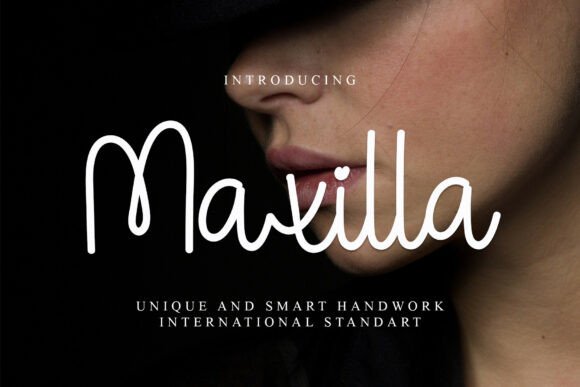
Maxilla is part of the Script Amp category, designed for those who want a stylish yet versatile script font. It features a natural flow with subtle variations in stroke weight, giving it a handcrafted feel. The font maintains clarity even at smaller sizes, making it suitable for both print and screen use. Whether you're designing a landing page or a social media graphic, Maxilla adds a touch of personality without overwhelming the layout.
Its visual characteristics include soft serifs and a slightly italicized flair that gives it a modern, contemporary edge. This makes it perfect for creative portfolios, boutique websites, and any project that requires a blend of elegance and approachability. The font’s versatility allows it to adapt to different contexts, whether it's a bold headline or a decorative accent.
Where to Use Maxilla in Your Web Design
Maxilla shines in areas where a handwritten aesthetic is desired but still needs to maintain legibility. Here are some practical applications:
- Hero Sections: Use Maxilla for large, eye-catching headers that draw users into your content.
- Call-to-Action Buttons: Its flowing style works well for buttons that encourage user interaction.
- Logo Text: Maxilla can be used as a primary typeface for logos, especially in creative industries like fashion, lifestyle, and art.
- Blog Headers: A great choice for blog titles that want to reflect a personal or artistic brand voice.
- Online Store Banners: Adds a unique flair to product pages and promotional banners.
- Course Sales Pages: Helps create an inviting and trustworthy atmosphere for educational content.
Designing for Readability and User Experience
When working with script fonts like Maxilla, it’s important to consider how they impact readability. While its elegant curves are visually appealing, they can sometimes make text harder to read on small screens or in dense layouts. To ensure optimal usability, pair Maxilla with a clean sans-serif font for body copy. This creates a balanced hierarchy that guides the reader’s eye through the content smoothly.
On mobile devices, use Maxilla sparingly—reserve it for headings, buttons, or short phrases. Avoid using it for long paragraphs or body text. Additionally, test how the font performs on dark and light backgrounds. Maxilla tends to look best on lighter backgrounds, though it can still work effectively on darker ones when paired with appropriate contrast.
Font Pairing and Brand Identity
Maxilla pairs beautifully with simple sans-serif fonts like Montserrat or Lato. This combination creates a modern, professional look while retaining the warmth and character of a script font. For editorial-style designs, consider pairing it with a serif font like Playfair Display for a more refined appearance.
When building a brand identity, consistency is key. Maxilla can serve as a signature typeface for your brand, helping to reinforce your visual language across all platforms. Whether it’s used in logo design, packaging, or social media graphics, its consistent style helps build recognition and trust.
Practical Tips for Using Maxilla
Before implementing Maxilla in your projects, ensure you have access to the necessary file formats and licensing rights. Check if the font includes webfont support, alternate styles, weights, and multilingual options. These details can significantly impact how you integrate the font into your digital assets.
For commercial use, verify that the license allows for website development, client projects, and online store creation. If you’re creating digital templates or brand kits, having access to multiple weights and alternates will give you greater flexibility in your design choices.
Conclusion
Maxilla is more than just a script font—it’s a tool that can enhance your web design with a touch of elegance and personality. By understanding its strengths and limitations, you can use it effectively to create engaging, readable, and visually appealing digital experiences. Whether you're building a portfolio site, launching a new product, or crafting a brand identity, Maxilla offers a unique way to express your creative vision while maintaining professionalism and usability.
⬇️ Download FreeFree download · No sign-up required🔗 You Might Also Like
Script AmpThe Beauty of Handcrafted Typography in Digital Spaces As a web designer, I've a...Script AmpPractical Uses for Welcome Planner in Web Design Hero Sections: Use Welcome Plan...Script AmpGolden Glamoura: A Timeless Script Font for Editorial DesignScript AmpRecently, I was working on a boutique online store’s homepage redesign. The clie...Script AmpLove Harmonic: A Beautiful Script Font for Digital Design